

News
Ichiba OnePlatform Team - 08/06/2026
In this article
Dropshipping has evolved from a side hustle model into a highly competitive, system-driven business where speed, accuracy, and scalability determine who survives. As order volumes increase and customer expectations rise, relying on spreadsheets, manual order placement, and fragmented tools quickly becomes a bottleneck rather than a strategy. This is where dropshipping automation software plays a critical role, not as a shortcut to success, but as the operational backbone that allows sellers to scale without losing control.
However, not all dropshipping automation tools are created equal, and automation alone does not guarantee profitability. Understanding what the best automated dropshipping software actually does, what it does not solve, and how to apply it at different business stages is essential for building a sustainable operation.
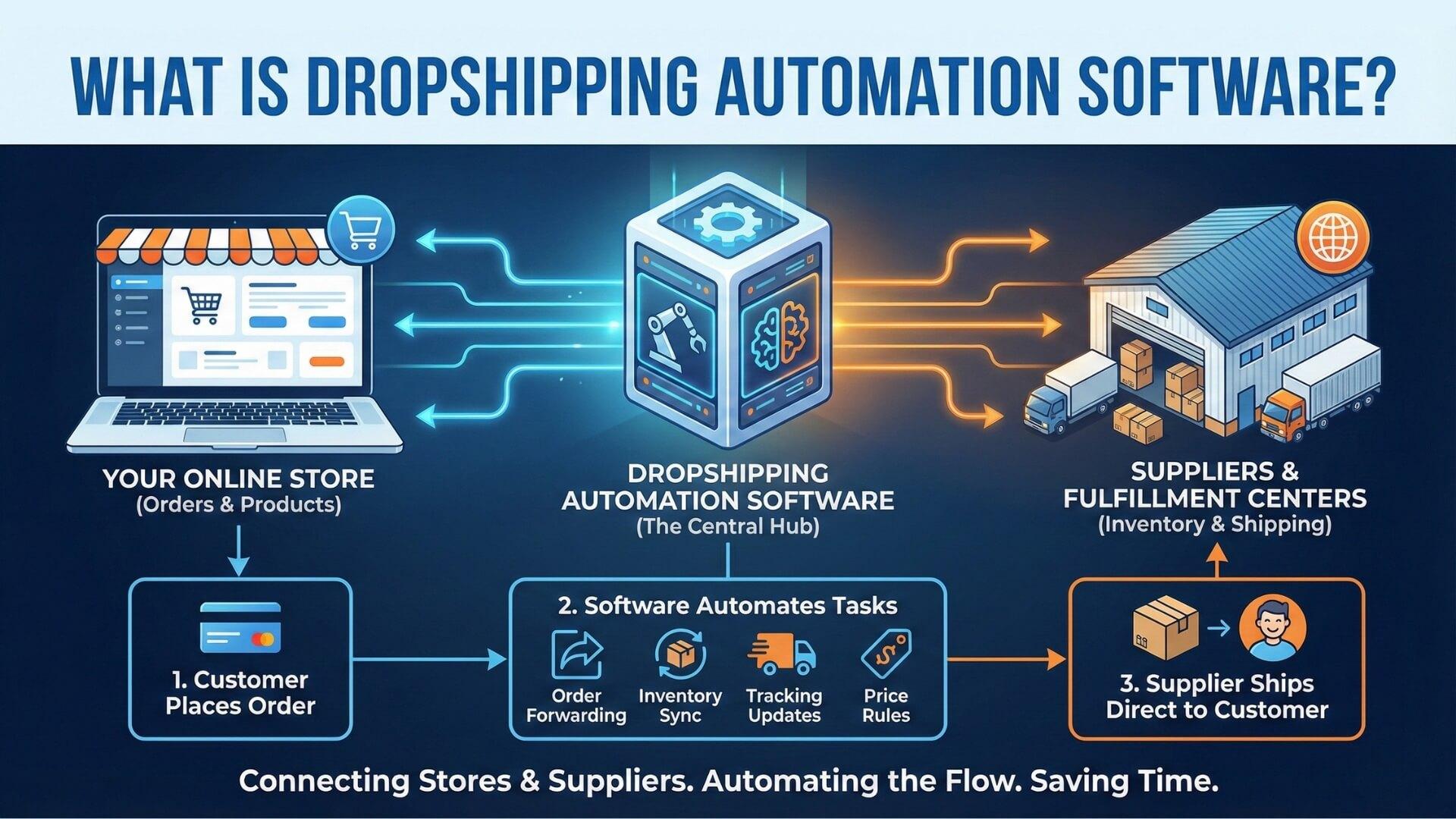
Dropshipping automation software refers to a category of tools designed to systemize and automate the operational tasks involved in running a dropshipping business. Instead of manually managing products, inventory, orders, and tracking information across multiple platforms, sellers use automation software for dropshipping to create a connected workflow where data moves automatically between the store, suppliers, and fulfillment partners.
At a functional level, automated dropshipping software acts as a bridge between your sales channel and your supply chain. When a customer places an order, the system can automatically validate inventory availability, apply pricing rules, submit the order to the supplier, and sync tracking information back to the storefront. This level of automation becomes increasingly important as order volume grows, because manual processes that work at ten orders per day often collapse at one hundred.
While features vary by platform, most automated dropshipping software is built to handle a consistent set of core operational tasks that consume the most time in day-to-day store management. These functions are designed to keep product data accurate, orders flowing, and customers informed without constant manual intervention.
Product import & syncing:
Automation software allows sellers to import products from suppliers into their store and keep titles, descriptions, variants, and images synchronized. When suppliers update product information, the changes can be reflected automatically, reducing mismatches between listings and actual inventory.
Inventory updates:
Stock levels are continuously monitored and updated to prevent overselling. When a supplier runs out of inventory or restocks an item, the automation system adjusts availability on the storefront in near real time.
Order placement with suppliers:
Once an order is placed by a customer, auto dropshipping software can submit the order to the supplier automatically using predefined rules. This eliminates manual checkout processes and reduces fulfillment delays.
Tracking number syncing:
After the supplier ships the order, tracking information is captured and synced back to the store. Customers receive updates without sellers needing to copy and paste tracking numbers across systems.
Price & cost rule automation:
Automation software for dropshipping can apply dynamic pricing rules based on supplier cost changes, shipping fees, or currency fluctuations. This helps protect margins while maintaining competitive pricing.
Customer notifications:
Automated dropshipping tools often integrate with email or store notification systems to keep customers informed about order confirmation, shipping status, and delivery updates, improving transparency and trust.
Despite its advantages, dropshipping automation software is not a solution for every problem in a dropshipping business. Understanding its limitations is just as important as understanding its capabilities.
Bad suppliers
Automation cannot fix unreliable suppliers, inconsistent product quality, or poor communication. If the supplier fails, automation only accelerates the failure.
Poor product market fit
No level of automation can compensate for products that do not meet market demand or lack a clear value proposition. Automation improves execution, not demand creation.
Unrealistic shipping promises
Automation tools can sync tracking and delivery updates, but they cannot shorten shipping times or change logistics realities. Overpromising delivery speed will still result in refunds and disputes.
In practice, the most effective use of dropshipping automation software comes from pairing automation with strong supplier selection, validated products, and realistic customer expectations. When these fundamentals are in place, automation becomes a powerful multiplier rather than a risky dependency.
Dropshipping automation tools are not built as a single all-in-one solution that fits every seller. Instead, automation is typically divided into functional layers, each addressing a specific part of the dropshipping workflow.
The sections below break down the most common and essential categories of automated dropshipping tools used in real-world operations.
Product and inventory automation tools focus on maintaining data accuracy between suppliers and storefronts. These tools reduce the manual workload associated with importing products, managing variants, and monitoring stock availability, which are common sources of errors in early-stage dropshipping.
Auto product import
Automation software allows sellers to import products directly from supplier catalogs into their store with structured data. Titles, descriptions, images, and variants are mapped automatically, reducing setup time and ensuring consistency across listings.
Variant syncing
When suppliers update product variants such as size, color, or packaging, automated dropshipping software keeps these changes synchronized. This prevents situations where customers order variants that no longer exist or have changed specifications.
Stock level updates
Inventory automation continuously monitors supplier stock levels and updates availability on the storefront. This is especially important for high-velocity products, where manual inventory checks quickly become unmanageable and lead to overselling.
These tools form the foundation of automation software for dropshipping, because accurate product and inventory data is required before any downstream automation can function reliably.
Dropshipping order and fulfillment automation tools handle the most operationally intensive part of dropshipping. As order volume grows, manually placing orders with suppliers becomes one of the first processes to break, making this category critical for scaling.
Auto ordering from suppliers
Once a customer places an order, the system automatically submits the order to the supplier using predefined rules. This reduces processing time and ensures orders are placed consistently without human delay.
Bulk order processing
For sellers handling dozens or hundreds of orders per day, automated dropshipping software can group and process orders in bulk. This improves efficiency and reduces the risk of missed or duplicated orders.
Error handling logic
Advanced automation tools include logic to flag issues such as out-of-stock items, pricing mismatches, or supplier failures. Instead of silently failing, the system creates exceptions that require manual review, protecting the business from costly mistakes.
Pricing automation tools are designed to protect margins in an environment where supplier costs, shipping fees, and currency rates change frequently. Without automation, sellers often discover margin losses only after refunds or chargebacks occur.
Auto price markups
Automation software can apply fixed or percentage markups to supplier costs. This ensures consistent pricing logic across the catalog without manual calculations.
Pricing rules
Advanced tools adjust prices dynamically based on changes in product cost, shipping fees, or supplier surcharges. This allows sellers to respond to cost fluctuations in near real time.
Currency and shipping fee logic
For cross-border dropshipping, automation software for dropshipping can factor in currency conversion and regional shipping fees automatically. This reduces pricing errors and improves profit predictability.
Customer communication and tracking automation tools focus on maintaining transparency and reducing support workload. Clear and timely communication plays a major role in reducing disputes and refund requests.
Auto emails
Automated dropshipping tools can trigger emails at key stages such as order confirmation, shipment, and delivery. These messages reassure customers and reduce inbound support inquiries.
Tracking page updates
Tracking information is synced automatically and displayed on branded tracking pages. Customers can monitor delivery progress without contacting support.
Delivery confirmation flows
Once an order is delivered, automation systems can trigger confirmation messages or follow-up workflows. This helps close the fulfillment loop and creates opportunities for reviews or repeat purchases.
Choosing the right dropshipping automation software requires more than comparing feature lists or monthly pricing. Automation becomes deeply embedded into daily operations, which means a poor choice can introduce silent errors, margin leaks, and scalability limits that only appear when order volume increases. The criteria below help sellers evaluate automation software based on real operational impact rather than marketing promises.
Integration depth
Strong automation depends on how deeply the software integrates with your storefront, suppliers, and fulfillment partners. Shallow integrations often rely on basic data pulls, which can break when product structures change or order volume spikes.
The best automated dropshipping software supports two-way syncing for products, inventory, orders, and tracking, ensuring that updates flow reliably across systems without manual intervention.
Supplier ecosystem
Automation is only as strong as the suppliers it connects to. Some tools focus on a narrow supplier network, while others support a broad ecosystem including agents, marketplaces, and private suppliers. Sellers should evaluate whether the automation software aligns with their current and future sourcing strategy, especially if they plan to diversify suppliers to reduce risk.
Automation flexibility
Not all businesses need the same level of automation. High-quality dropshipping automation tools allow sellers to define rules, conditions, and exceptions rather than forcing rigid workflows. Flexibility includes the ability to automate selectively, override decisions manually, and adjust logic as the business evolves from testing to scaling.
Error handling and logging
Automation failures are inevitable, but silent failures are dangerous. Reliable automation software for dropshipping provides clear error logs, alerts, and exception queues so sellers can quickly identify and resolve issues. This visibility is critical for auditing performance, preventing repeated mistakes, and maintaining operational control as automation expands.
Scalability limits
Some automation tools work well at low order volumes but struggle as catalogs and transactions grow. Sellers should assess limits related to SKUs, daily orders, API usage, and multi-store support. The best dropshipping automation software is built to scale gradually without forcing disruptive platform changes at key growth stages.
Cost vs margin impact
Pricing should be evaluated in relation to saved time, reduced errors, and improved fulfillment speed, not just subscription fees. Even free dropshipping automation software can become costly if it introduces fulfillment delays or pricing mistakes. Sellers should measure how automation affects cost per order, refund rates, and operational labor to determine true ROI.
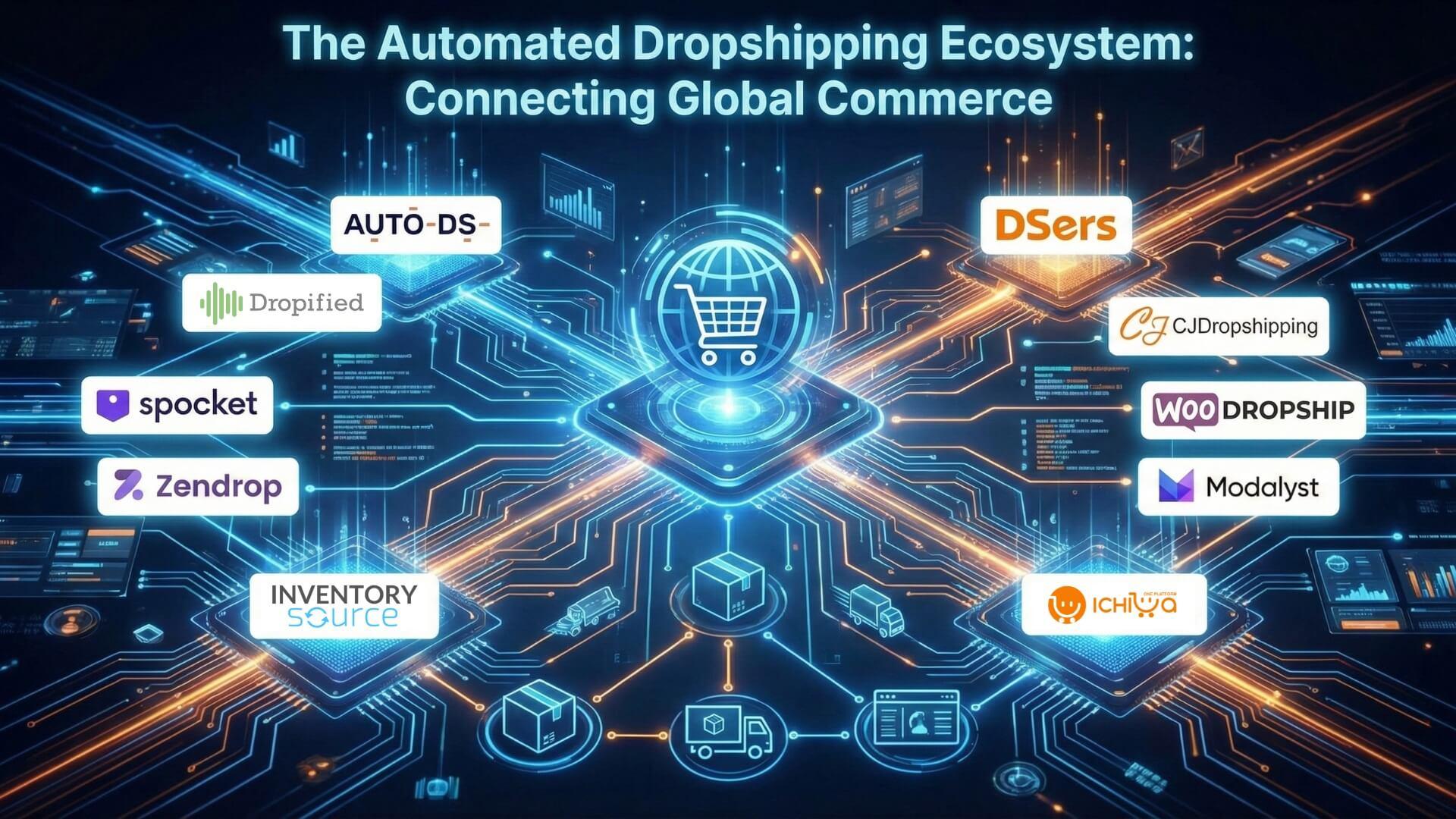
Below are some of the most widely used paid solutions that combine dropshipping automation tools with advanced features for mid-to-large stores:
AutoDS: A comprehensive automation hub covering product importing, inventory sync, automated order fulfillment, and dynamic pricing updates. It integrates with multiple eCommerce platforms and supports dozens of suppliers worldwide, making it one of the most complete solutions for sellers who want end-to-end automation.
Dropified: Known for its robust workflow automation, Dropified helps sellers automate product imports from a wide range of sources, manage multi-supplier catalogs, and set up custom workflows to handle pricing, fulfillment, and variant mapping.
Spocket: A strong option for sellers targeting faster delivery times and higher-quality products from U.S. and EU suppliers. It automates inventory management, order processing, and bulk checkouts while offering AI-assisted product discovery.
Zendrop: A fulfillment-focused automation platform that streamlines order placement, tracking number sync, and shipping notifications, with an emphasis on faster delivery and branded customer communication.
Inventory Source: Ideal for sellers with large catalogs or multi-channel operations, this platform automates inventory updates, product data management, and routes orders across hundreds of supplier integrations.
For sellers who are just starting out or experimenting with automation without making a financial commitment, several free or free-tier solutions provide meaningful automation capabilities. These options help you eliminate repetitive tasks like product importing, inventory syncing, and order processing while testing workflows before scaling.
DSers: A popular choice for AliExpress-centric sellers, DSers offers free access to essential automation features such as bulk order fulfillment, real-time inventory sync, and supplier optimization. It’s a solid starting point for anyone relying on AliExpress products and seeking basic dropshipping automation tools.
CJDropshipping: Known for its free tools that streamline sourcing and global fulfillment, CJDropshipping lets sellers automate key steps like order placement and shipment tracking without a subscription cost, making it ideal for lean startups.
WooDropship: Designed for WordPress/WooCommerce stores, WooDropship automates product imports and inventory syncing from supported marketplaces, helping sellers maintain accurate listings with minimal manual work.
Modalyst (Free Plan): Modalyst’s free plan includes automated product syncing and order routing to select suppliers. While limited compared to paid tiers, it gives sellers access to curated products and dropshipping automation tools without upfront costs.
IChiba OnePlatform (Free Plan & Tools): IChiba OnePlatform delivers a broader ecosystem of SaaS tools that support automated fulfillment, product data management, and multi-channel operations within a single interface. Sellers can start with free access to core features and expand into automated workflows such as inventory synchronization, order fulfillment, and cross-market selling as their business grows. IChiba integrates product sourcing, storefront management, and fulfillment automation to reduce manual tasks and streamline dropshipping operations for emerging sellers.
Dropshipping automation software delivers the most value when it is applied through structured workflows rather than isolated features. Different business stages require different levels of automation, and applying advanced automation too early can introduce unnecessary risk. Well-designed workflows help sellers balance efficiency, control, and scalability while using automated dropshipping software in a way that matches their operational maturity.
The workflows below illustrate how dropshipping automation tools are commonly deployed at three key stages of growth, from early experimentation to full-scale operations.
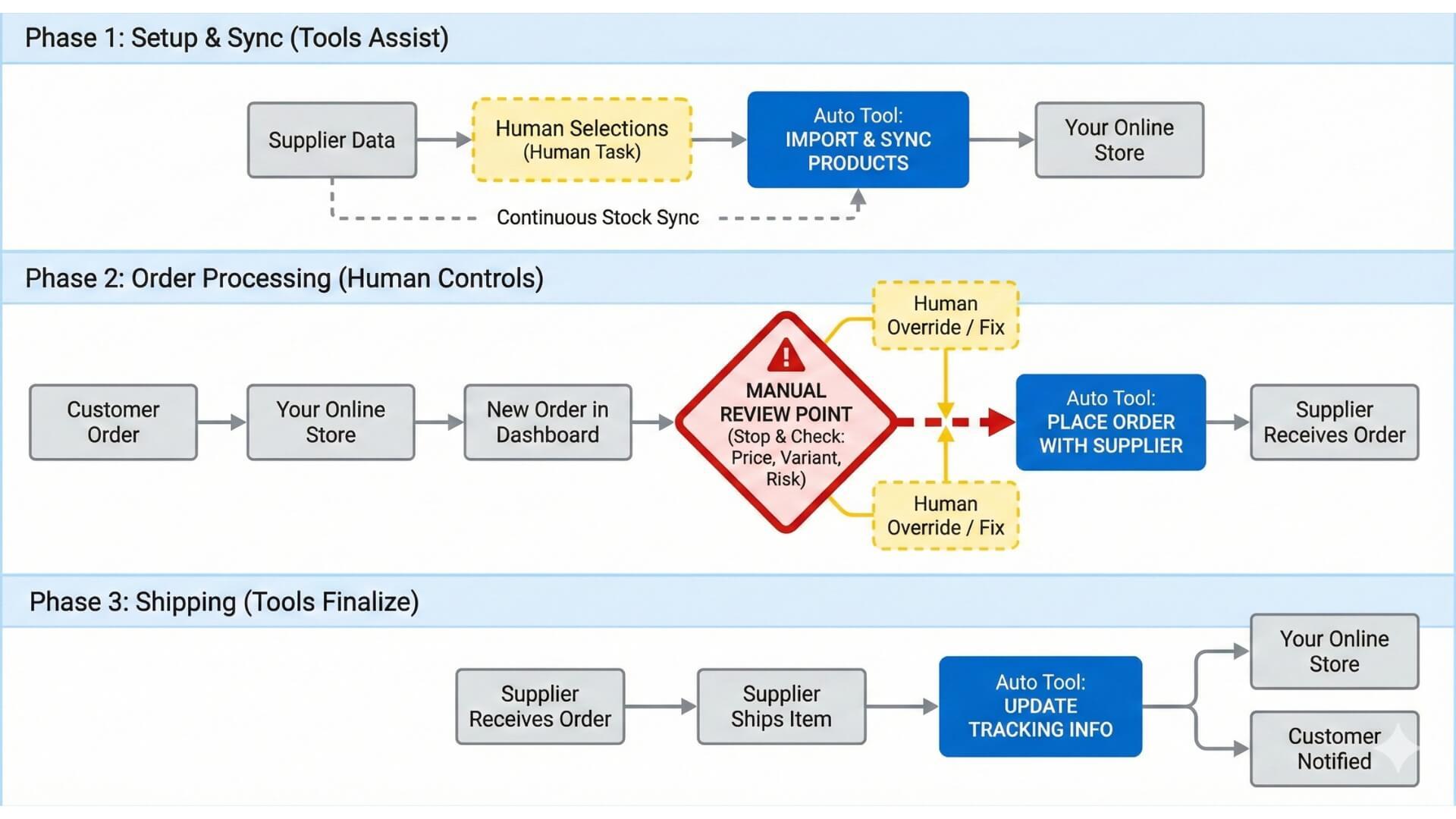
For beginners, the goal of automation is to reduce manual workload without removing visibility or control. At this stage, sellers are still validating products, testing suppliers, and learning how their store performs under real customer demand. Semi-automation is usually more effective than full automation.
In a beginner workflow, automation software for dropshipping is typically used for product importing, basic inventory syncing, and tracking number updates. Orders may still be reviewed manually before being placed with suppliers, allowing sellers to catch issues such as incorrect variants, pricing mismatches, or unexpected shipping fees. Manual overrides remain a core part of the process, which helps reduce the risk of costly mistakes during early testing.
Because order volume is relatively low, this workflow prioritizes learning and risk control over speed. Automated dropshipping software acts as a support system rather than a replacement for hands-on management.
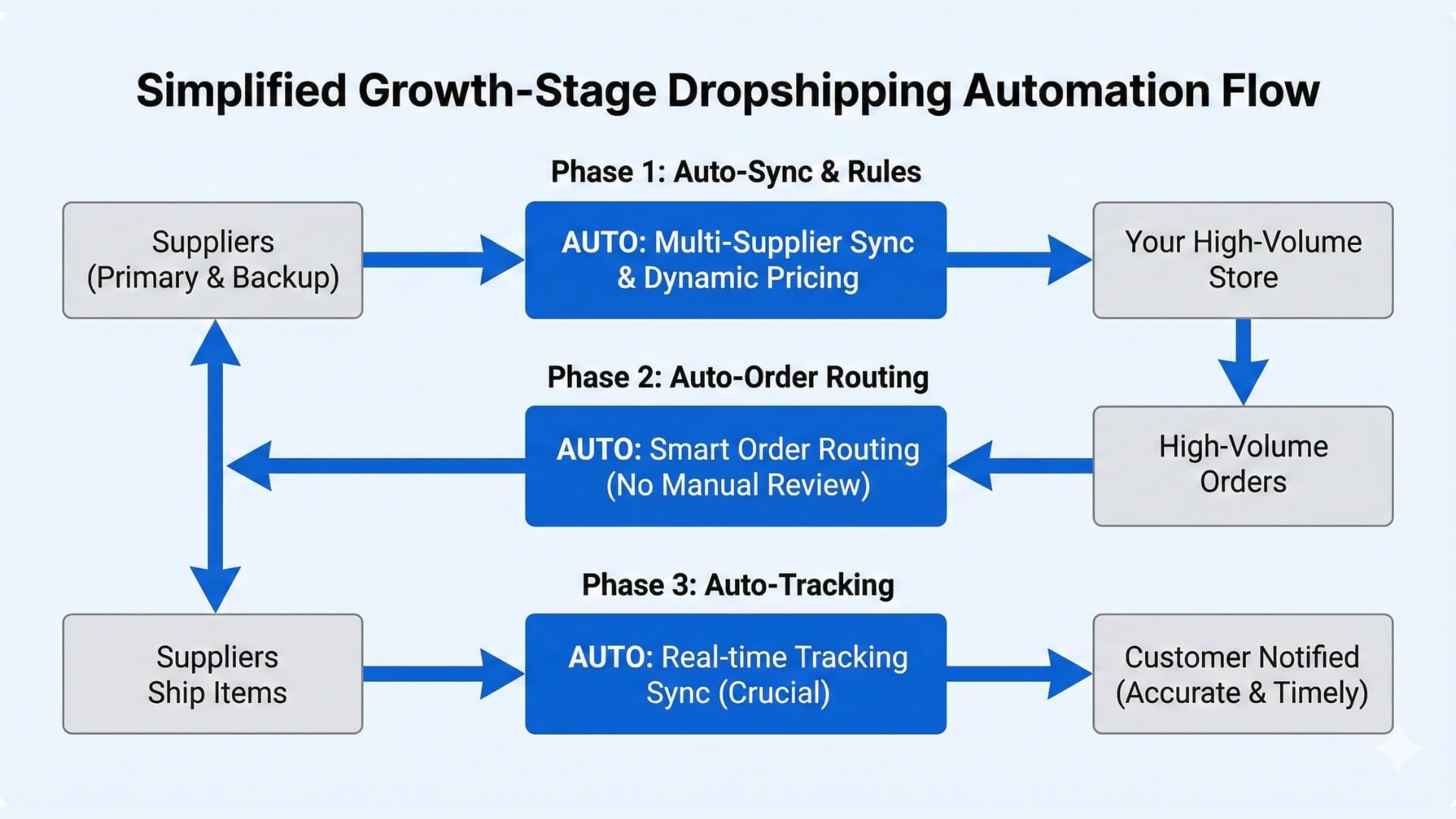
Once a store has validated products and consistent order flow, automation becomes essential for maintaining performance as volume increases. At the growth stage, sellers shift from manual decision-making to automation that handles the majority of operational tasks.
In this workflow, dropshipping automation software manages product syncing, inventory updates, automated order placement, and tracking synchronization. Pricing and cost rules are introduced to protect margins as supplier costs fluctuate. Supplier redundancy becomes more important, with automation logic routing orders to backup suppliers when primary sources fail or go out of stock.
Tracking sync accuracy is a key focus at this stage, as delayed or missing tracking information is a major driver of customer support tickets and disputes. Automation helps maintain consistent communication while freeing up time for marketing and optimization efforts.
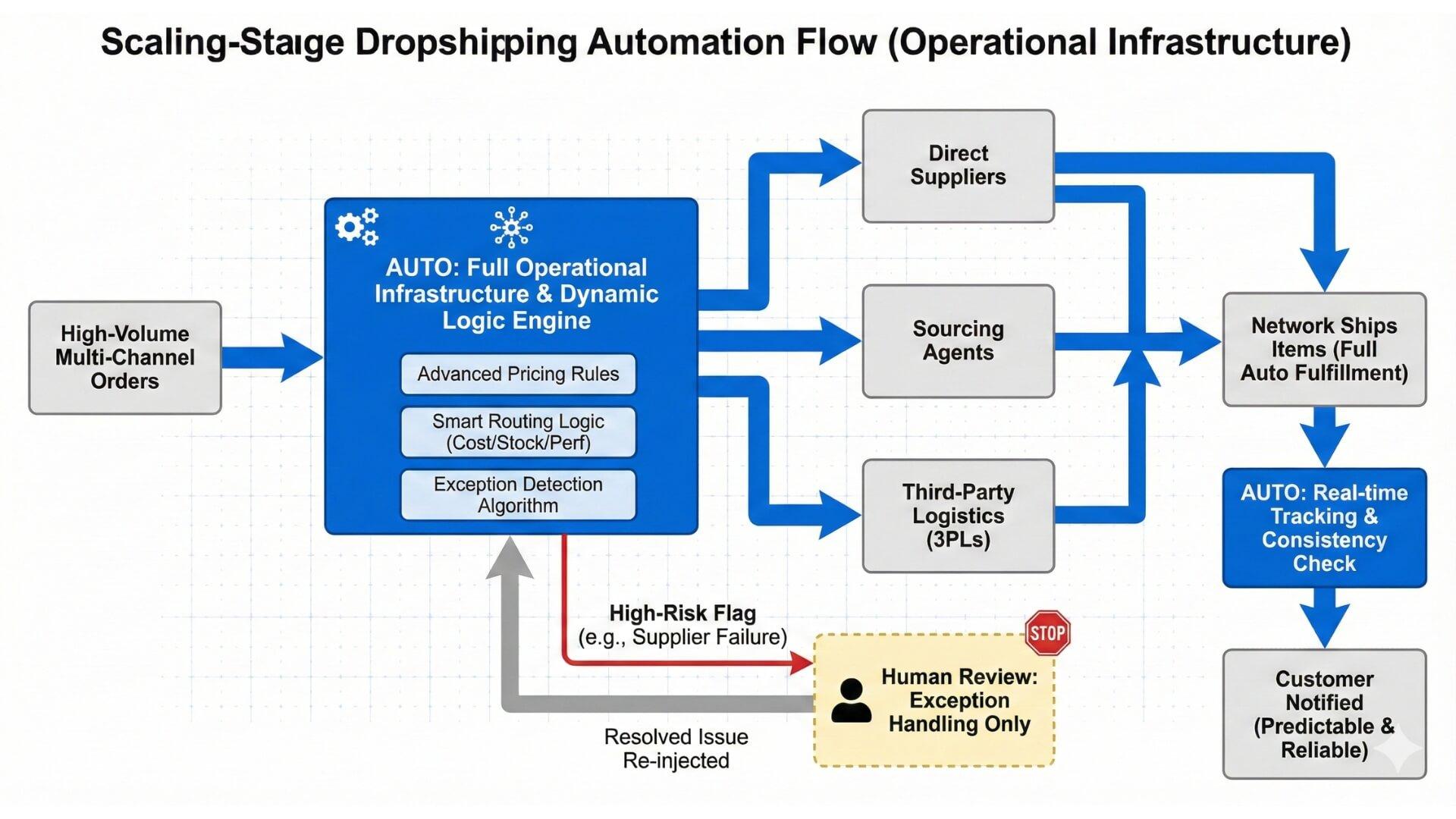
At the scaling stage, dropshipping automation software evolves into a full operational infrastructure. Order volume is high enough that manual intervention is reserved only for exceptions, and most fulfillment processes run automatically.
This workflow typically includes full auto fulfillment, advanced pricing logic, and integration with agents or third-party logistics providers. Automation software for dropshipping routes orders dynamically based on cost, stock availability, and delivery performance. Exception handling systems flag only high-risk issues, such as supplier failures or delivery delays that require human review.
At scale, the focus shifts from saving time to maintaining reliability and predictability. Automated dropshipping tools are used to enforce consistency across thousands of orders while allowing the business to expand into new markets, suppliers, and sales channels without rebuilding the operational stack.
While dropshipping automation software can dramatically improve efficiency, many sellers run into avoidable problems by misunderstanding how and when automation should be applied. These mistakes often do not appear immediately and usually surface only after order volume increases, which makes them expensive and difficult to reverse.
One of the most frequent mistakes is implementing full automation before the business fundamentals are stable. Early-stage sellers often assume that automation equals scalability, when in reality it can create a false sense of control.
When products, suppliers, or pricing logic are not fully validated, automation simply amplifies existing weaknesses. Poor data inputs lead to automated chaos, where incorrect pricing, unavailable stock, or supplier errors are executed at scale. Instead of saving time, sellers end up spending more effort fixing mistakes that could have been caught manually at a lower volume.
Automation should follow validation. Semi-automated workflows that allow manual review help build confidence and data accuracy before moving toward full automation.
Another critical mistake is assuming that automation systems do not require oversight. Even the best automated dropshipping software relies on external inputs such as supplier inventory, shipping status, and cost data, all of which can fail or change unexpectedly.
Human checks still matter, especially for high-value orders, new suppliers, or unusual exceptions. Sellers who ignore automation logs and alerts often miss early warning signs such as repeated fulfillment errors or delayed tracking updates. Regular auditing of automation logs helps identify patterns and prevent small issues from turning into large-scale customer complaints or refund spikes.
Automation does not eliminate supplier risk. In fact, heavy reliance on a single supplier combined with automated fulfillment can increase exposure when that supplier fails.
When inventory goes out of stock or shipping times increase, automation continues to push orders through unless backup logic is in place. This leads to delayed deliveries, refunds, and damaged customer trust. Sellers often mistake automated dropshipping tools for supplier reliability, which are two very different concepts.
Reducing this risk requires supplier redundancy and backup routing logic within the automation software for dropshipping. By preparing alternative fulfillment paths, sellers ensure that automation supports resilience rather than creating a single point of failure.
Selecting the right dropshipping automation software is a decision that impacts your daily operations, profitability, and long-term ability to scale. With so many options available, the most effective approach is not to chase the most features or the highest price tier, but to choose a tool that aligns with your specific business challenges and growth objectives.
Before committing to any dropshipping automation software, sellers should slow down and analyze their current operations in detail. These questions are not meant to be answered quickly, but to reveal where automation will genuinely create leverage and where it may introduce unnecessary risk. A clear understanding at this stage prevents costly tool switches and workflow rebuilds later.
What tasks cost me the most time today?
Every dropshipping business has a small set of repetitive tasks that consume a disproportionate amount of time. For some sellers, this is manual order placement with suppliers. For others, it is inventory checks, pricing updates, or customer tracking inquiries.
By identifying these time drains, sellers can prioritize automation features that deliver immediate operational relief instead of paying for advanced capabilities they will not use. The best automated dropshipping software should directly address these high-friction tasks first.
What breaks when order volume doubles?
Many workflows function adequately at low volume but collapse when orders increase. Common breaking points include delayed order placement, missed tracking updates, inventory overselling, and inconsistent customer communication.
Sellers should map their current workflow and stress test it mentally by doubling order volume. Automation software for dropshipping should be evaluated based on its ability to stabilize these failure points rather than just improve convenience.
Which supplier ecosystem do I rely on?
Automation tools vary widely in how they integrate with suppliers. Some focus on marketplaces like AliExpress, while others support private suppliers, agents, or regional fulfillment partners. Choosing a tool that aligns poorly with your supplier ecosystem can lead to partial automation or manual workarounds that defeat the purpose of automation.
Sellers should also consider future supplier diversification and ensure the dropshipping automation software can scale beyond a single sourcing model.
What is my acceptable error rate?
No automation system is perfect, and errors will occur. The key question is how visible and manageable those errors are. Sellers should define what level of error is acceptable in their business and choose tools that provide clear alerts, logs, and exception handling.
Automated dropshipping software that hides failures or lacks auditability increases risk, especially as order volume grows. Transparency and control matter more than raw automation speed.
Once you understand your needs, the next step is to match automation capabilities with your strategic goals. Not all automation software suits every stage of business growth, and mismatched tools can create more complexity than they solve.
Speed vs Control
If your priority is rapid order processing with minimal oversight, choose a tool with strong auto fulfillment and bulk order features. If maintaining strict control over pricing, supplier selection, and exceptions is more important, select a platform that allows granular automation rules and manual overrides.
Cost vs Scalability
Free or low-cost tools are appealing, but they often come with limits on order volume, supplier connections, or automation flexibility. Evaluate whether the tool’s constraints might slow growth or force a platform switch later - a costly and disruptive upgrade.
Short-term Testing vs Long-term Brand Building
If you are testing products and markets, tools that support semi-automation and easy manual review help you learn faster with lower risk. Sellers focused on building a brand with predictable processes should prioritize platforms that support full automation with strong error handling and multi-channel support.
Choosing automation software should be viewed through a return on investment lens, not just cost. A tool that costs more but reduces refunds, saves hours of manual work, and eliminates costly errors may deliver a higher ROI than a cheaper solution with shallow automation.
Cost per Order Before vs After Automation
Measure how much it costs you in time and fees to process an order manually versus with automation. A significant delta suggests automation value that compounds as volume grows.
Refund and Dispute Reduction
Automation that ensures accurate tracking, inventory sync, and pricing consistency reduces the most common drivers of disputes. Lower refund rates directly improve profit margins and customer satisfaction.
Founder Time Saved
Time saved on repetitive tasks translates into hours you can spend on product research, marketing strategy, supplier negotiations, and other high impact activities. Calculate what your time is worth and include this in your ROI evaluation.
Can dropshipping be fully automated?
Dropshipping can be highly automated, but it is rarely wise to remove human oversight completely. With the right dropshipping automation software, sellers can automate product syncing, inventory updates, order placement, tracking synchronization, and customer notifications.
However, areas such as supplier performance review, exception handling, and strategic pricing decisions still benefit from human judgment. Full automation works best when combined with monitoring systems that surface issues rather than hide them.
What is the best automated dropshipping software?
The best automated dropshipping software depends on your business stage, supplier model, and growth goals. Sellers focused on marketplace suppliers may prioritize tools with deep catalog and order integrations, while brand builders often prefer platforms that support private suppliers and flexible automation rules.
Instead of searching for a single best tool, it is more effective to choose automation software for dropshipping that aligns with your current workflows and can scale as complexity increases.
Are there free dropshipping automation tools?
Yes, several platforms offer free dropshipping automation software or free tiers with limited functionality. These tools typically cover basic features such as product import, inventory syncing, and bulk order processing.
While free tools are useful for learning automation concepts and testing workflows, they often come with volume limits, fewer integrations, or reduced error handling. As order volume grows, many sellers eventually upgrade to paid solutions to avoid operational bottlenecks.
Does automation reduce refunds?
Automation can significantly reduce refunds when applied correctly. Accurate inventory syncing prevents overselling, automated tracking updates reduce customer anxiety, and pricing rules help avoid margin errors that lead to cancellations.
However, automation does not fix poor suppliers or unrealistic delivery promises. Refund reduction comes from combining automated dropshipping tools with reliable suppliers and clear customer communication.
When should I stop manual fulfillment?
Manual fulfillment usually becomes a liability when order volume reaches a level where delays, missed updates, or human errors increase. For many sellers, this happens when daily orders exceed what can be processed consistently within a few hours. At that point, introducing order and fulfillment automation improves speed and consistency. A gradual transition using semi-automation often works better than an abrupt switch to full auto fulfillment.
Dropshipping automation software is no longer a nice-to-have tool for sellers who want to grow. As competition increases and customer expectations continue to rise, automation becomes a structural requirement for maintaining speed, accuracy, and profitability.
At the same time, automation is not a replacement for strong fundamentals. Reliable suppliers, validated products, and realistic delivery expectations remain the foundation of any successful dropshipping operation.
In a market where execution speed and consistency are competitive advantages, automation software for dropshipping is not about removing humans from the process. It is about freeing sellers to focus on strategy, supplier relationships, and customer experience while letting systems handle repeatable execution. When used this way, automation becomes a sustainable advantage rather than a risky dependency.

Work with us
Our solutions
Address:
 〒136-0082, Japan, Tokyo, Koto-ku, Shinkiba 3-5-6, 5F
Connect us:


Japan
〒136-0082, Japan, Tokyo, Koto-ku, Shinkiba 3-5-6, 5F
Texas, USA
1606 Audrey Dr, Garland, TX 75040, United States
California, USA
1316 John Reed Ct, City of Industry, CA 91745, United States